A lean, fast RTTY terminal and QSO log for TCI radios — SunSDR with ExpertSDR3 v1.3.2+, over the latest TCI 2.1 protocol. Audio, frequency, PTT, filters and AGC over a single TCI link: no virtual cables, no CAT, no COM ports.
Un terminale RTTY snello e veloce, con log QSO, per radio TCI — SunSDR con ExpertSDR3 v1.3.2+, con l'ultimo protocollo TCI 2.1. Audio, frequenza, PTT, filtri e AGC su un'unica connessione TCI: niente cavi virtuali, niente CAT, niente porte COM.
NEWNOVITÀAutomatic SPLIT UP MODE for DX EXPEDITION with Multi Decoder →SPLIT UP MODE automatico per DX EXPEDITION con Multi Decoder → NEWNOVITÀSECOND DECODER ALWAYS ON — the DX NOISE FILTER for weak and fading signals, beside the standard one →SECONDO DECODER SEMPRE ATTIVO — il DX NOISE FILTER per segnali deboli e in fading, accanto a quello standard → NEWNOVITÀNB noise blanker and automatic NOTCH: static crashes and carriers removed before the decoders →NB noise blanker e NOTCH automatico: scariche e portanti tolte prima dei decoder → NEWNOVITÀTX DELAY to protect radio and amplifier, and the new TCI 2.1 protocol →TX DELAY per proteggere radio e amplificatore, e il nuovo protocollo TCI 2.1 → NEWNOVITÀAvailable for WINDOWS and LINUX — the Linux version is BETA and needs more testing before the final release →Disponibile per WINDOWS e per LINUX — la versione Linux è BETA e ha bisogno di altre prove prima della versione definitiva →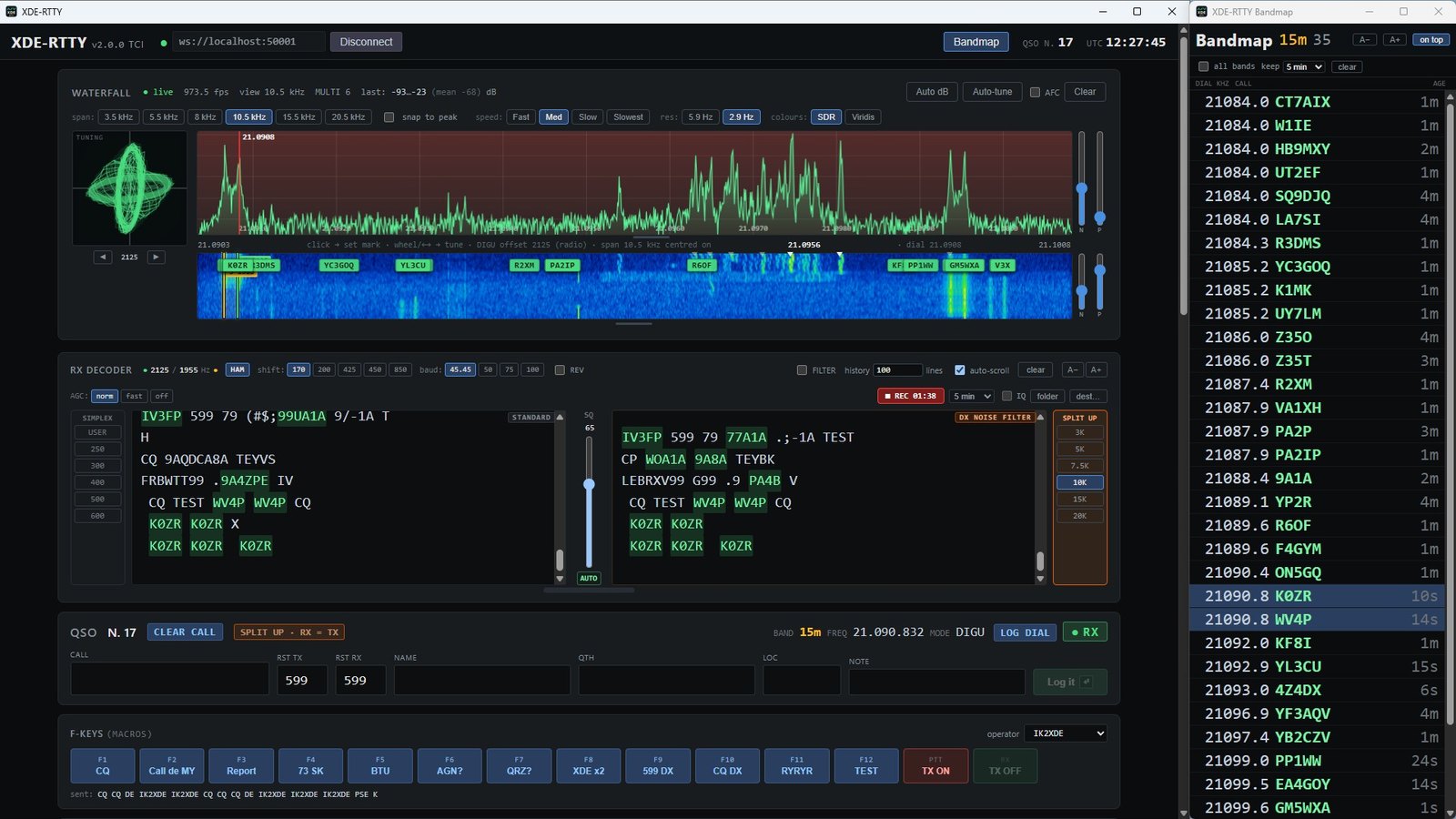
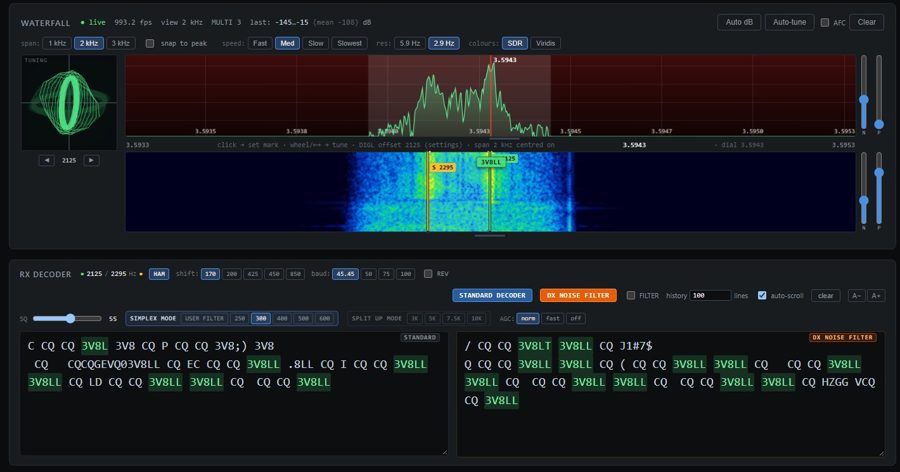
A second RTTY decoder built for weak, fading and disturbed signals, running beside the standard one on the same audio. Where the standard decoder turns a weak station into garbage, the DX NOISE FILTER often still prints clean copy. On real off-air recordings it made half the errors of the standard decoder on 40 m and a third on 20 m. Its window is always open beside the standard one.
Un secondo decoder RTTY pensato per segnali deboli, in fading e disturbati, che lavora accanto a quello standard sullo stesso audio. Dove il decoder standard trasforma una stazione debole in caratteri senza senso, il DX NOISE FILTER spesso la copia ancora pulita. Su registrazioni reali ha fatto metà degli errori del decoder standard in 40 m e un terzo in 20 m. La sua finestra è sempre aperta accanto a quella standard.
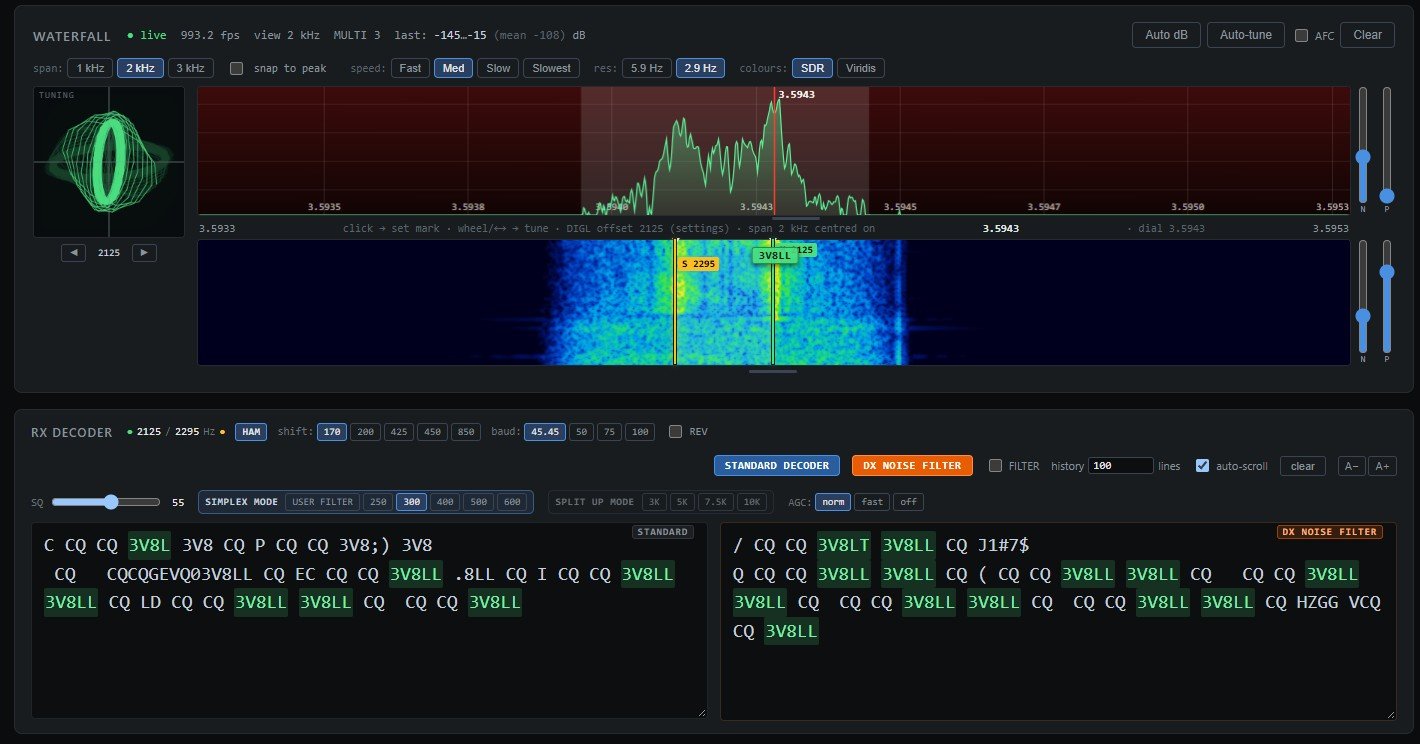
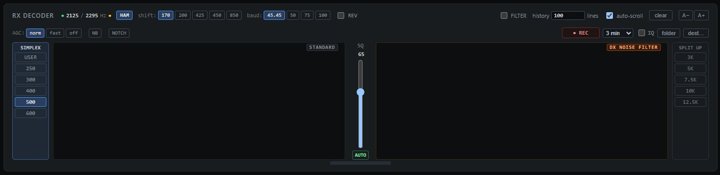
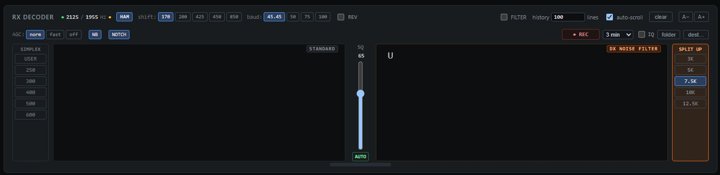
The STANDARD and DX NOISE FILTER windows are always open side by side, at equal width: read whichever copies better. SIMPLEX filters on the left, SPLIT UP filters on the right, the squelch between them.
Le finestre STANDARD e DX NOISE FILTER sono sempre aperte, affiancate e della stessa larghezza: leggi quella che copia meglio. Filtri SIMPLEX a sinistra, filtri SPLIT UP a destra, lo squelch in mezzo.
Signals close to the noise, QSB and deep fades, selective fading, flutter on polar paths, stations slightly off tune, strong neighbours nearby: the conditions where RTTY copy normally falls apart. No settings of its own — same tones, shift, baud and SQ as the standard decoder.
Segnali vicini al rumore, QSB ed evanescenze profonde, fading selettivo, flutter sui percorsi polari, stazioni leggermente fuori sintonia, vicini forti: le condizioni in cui la copia RTTY di solito si rovina. Nessuna regolazione propria: stessi toni, shift, baud e SQ del decoder standard.
| Character errorsErrori sui caratteri | Standard | DX |
|---|---|---|
| Real recording, 40 m weak + fadingRegistrazione reale, 40 m debole + fading | 43.8 % | 22.4 % |
| Real recording, 20 mRegistrazione reale, 20 m | 3.6 % | 1.3 % |
| ConditionCondizione | BetterMeglio |
|---|---|
| Weak signal near the noise, QRN, staticSegnale debole vicino al rumore, QRN, statiche | DX |
| QSB, slow fading, deep fadesQSB, fading lento, evanescenze profonde | DX |
| Selective fading, flutter, polar / auroral pathsFading selettivo, flutter, percorsi polari / aurorali | DX |
| QRM: strong station a few hundred Hz awayQRM: stazione forte a poche centinaia di Hz | DX |
| Station off-tune or driftingStazione fuori sintonia o in deriva | DX |
| Strong, clean signalSegnale forte e pulito | BothEntrambi |
| Short static crashes, impulsive QRNScariche brevi, QRN impulsivo | Try bothProva entrambi |
| Right after a QSY, first characters of a transmissionSubito dopo un QSY, primi caratteri di una trasmissione | STANDARD |
| Fast contest exchanges with good signalsScambi veloci in contest con buoni segnali | STANDARD |
The standard decoder prints from the very first character; the DX NOISE FILTER needs one or two characters to lock on and runs about one character behind. Best of both: keep the two windows side by side and read the right one for weak, fading or disturbed stations.
Il decoder standard scrive dal primissimo carattere; il DX NOISE FILTER ha bisogno di uno o due caratteri per agganciarsi e resta circa un carattere indietro. Il meglio dei due: tieni le due finestre affiancate e leggi quella di destra per le stazioni deboli, in fading o disturbate.
Transmit on your frequency, listen to the whole pileup up to 12.5 kHz above it, see every caller decoded and labelled on the waterfall and in the bandmap, and pick the next one with a single click. Common RTTY programs need the radio's second VFO, a manual split and an operator who finds callers by ear. In XDE-RTTY it is one button.
Trasmetti sulla tua frequenza, ascolti tutto il pile-up fino a 12,5 kHz sopra, vedi ogni chiamante decodificato ed etichettato sul waterfall e nella bandmap, e scegli il prossimo con un solo clic. I comuni programmi RTTY richiedono il secondo VFO della radio, lo split impostato a mano e un operatore che trova i chiamanti a orecchio. In XDE-RTTY basta un pulsante.
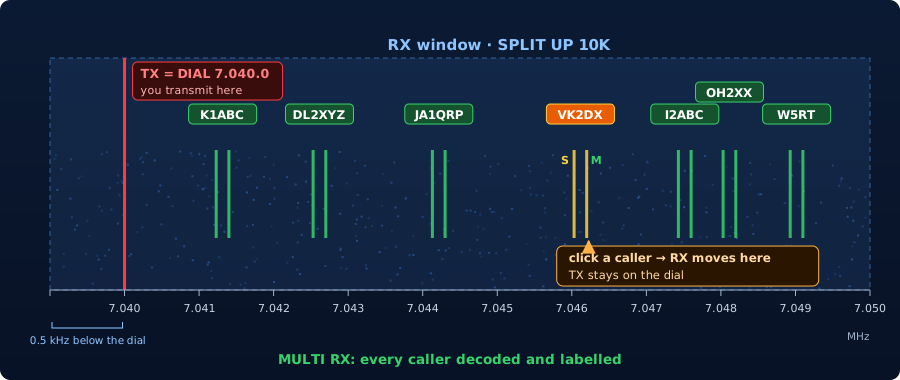
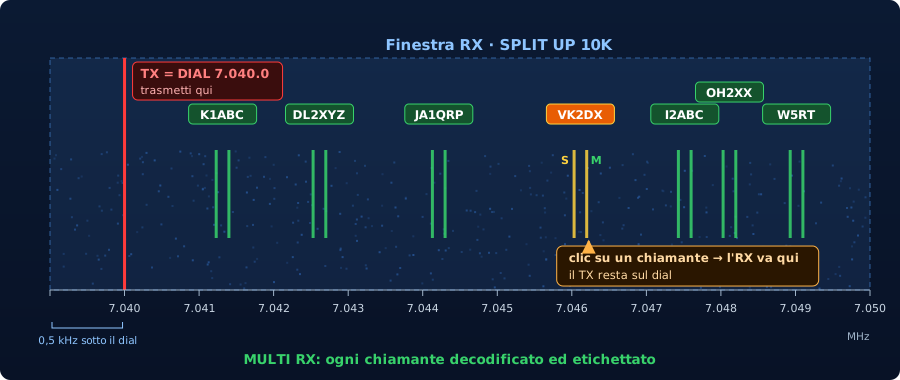
FREQ (TX) and FREQ_RX (RX), also sent to your logger via UDP.FREQ (TX) e FREQ_RX (RX), inviate anche al tuo log via UDP.| XDE-RTTY | Common programsProgrammi comuni | |
|---|---|---|
| Split setupImpostare lo split | 1 click1 clic | VFO B / split on the radioVFO B / split sulla radio |
| Callers decodedChiamanti decodificati | all at once (up to 20)tutti insieme (fino a 20) | one at a timeuno alla volta |
| Finding the next callerTrovare il prossimo | labels + bandmapetichette + bandmap | tune and listensintonizzare e ascoltare |
| Logged frequenciesFrequenze a log | FREQ + FREQ_RX | often TX onlyspesso solo TX |
Filters 3K / 5K / 7.5K / 10K / 12.5K → span 3.5 / 5.5 / 8 / 10.5 / 13 kHz, always tied together. Nothing to set in ExpertSDR for DIGU: XDE-RTTY sets the DIGU offset by itself while in SPLIT UP and puts it back afterwards (see below).
Filtri 3K / 5K / 7.5K / 10K / 12.5K → span 3,5 / 5,5 / 8 / 10,5 / 13 kHz, sempre legati. Niente da impostare in ExpertSDR per il DIGU: XDE-RTTY regola da solo l'offset DIGU mentre sei in SPLIT UP e poi lo rimette com'era (vedi sotto).
For SunSDR radios with ExpertSDR3 v1.3.2 or later · XDE-RTTY uses the latest TCI 2.1 protocolPer radio SunSDR con ExpertSDR3 v1.3.2 o successivi · XDE-RTTY usa l'ultimo protocollo TCI 2.1
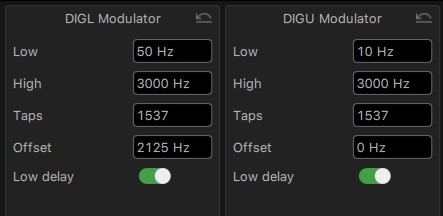
TX → DIGL Modulator → Offset = 2125 Hz
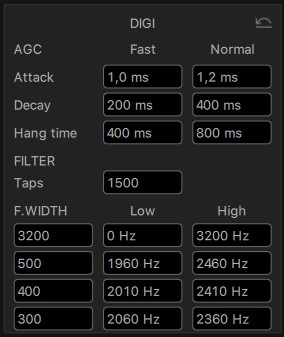
Before using XDE-RTTY, set these two ExpertSDR panels exactly as shown. With DIGL offset 2125 the radio display shows the mark frequency, like FSK radios, RBN skimmers and DX cluster spots; XDE-RTTY reads it from the radio (or uses 2125 from Settings → Radio). Most "no decode / wrong frequency / off-centre filter" questions come from these settings.
Prima di usare XDE-RTTY imposta questi due pannelli di ExpertSDR esattamente come in figura. Con offset DIGL 2125 il display della radio mostra la frequenza del mark, come le radio in FSK, gli skimmer RBN e gli spot del DX cluster; XDE-RTTY lo legge dalla radio (o usa il 2125 di Settings → Radio). Quasi tutti i problemi del tipo "non decodifica / frequenza sbagliata / filtro non centrato" dipendono da queste impostazioni.
| TX | DIGL (RTTY)(RTTY) | DIGU (FT8/FT4)(FT8/FT4) |
|---|---|---|
| Low | 50 Hz | 10 Hz |
| High | 3000 Hz | 3000 Hz |
| Taps | 1537 | 1537 |
| Offset | 2125 Hz | 0 Hz |
| Low delay | OnAttivo | OnAttivo |
| Offset only in DIGL. Leave DIGU at 0, as WSJT-X wants it: in SPLIT UP XDE-RTTY sets it by itself and puts it back.Offset solo in DIGL. Il DIGU resta a 0, come lo vuole WSJT-X: in SPLIT UP lo regola XDE-RTTY e poi lo rimette com'era. | ||
| RX → DIGI F.WIDTH | Low | High |
|---|---|---|
| 3200 | 0 Hz | 3200 Hz |
| 500 | 1960 Hz | 2460 Hz |
| 400 | 2010 Hz | 2410 Hz |
| 300 | 2060 Hz | 2360 Hz |
| 3200: the wide filter, ready for FT8 and FT4 (and USER FILTER in XDE-RTTY). Narrow filters centred on 2210 Hz (between mark 2125 and space 2295). Taps 1500.3200: il filtro largo, già pronto per FT8 e FT4 (e USER FILTER in XDE-RTTY). Filtri stretti centrati su 2210 Hz (tra mark 2125 e space 2295). Taps 1500. | ||
★ One setup for RTTY and FT8 / FT4. With these settings you never have to touch ExpertSDR when you switch from XDE-RTTY to WSJT-X, JTDX or any similar program for FT8 and FT4, and back: DIGL with offset 2125 is for RTTY, DIGU with offset 0 for FT8/FT4, and the 3200 Hz DIGI filter is ready for the wide digital modes. Even in SPLIT UP, which uses DIGU, XDE-RTTY sets the offset by itself and restores it when you go back to SIMPLEX or close the program.
★ Una sola configurazione per RTTY e FT8 / FT4. Con queste impostazioni non devi più toccare ExpertSDR quando passi da XDE-RTTY a WSJT-X, JTDX o qualsiasi programma simile per FT8 e FT4, e viceversa: il DIGL con offset 2125 è per l'RTTY, il DIGU con offset 0 per FT8/FT4 e il filtro DIGI da 3200 Hz è già pronto per i modi digitali larghi. Anche in SPLIT UP, che usa il DIGU, XDE-RTTY regola da solo l'offset e lo rimette com'era quando torni in SIMPLEX o chiudi il programma.
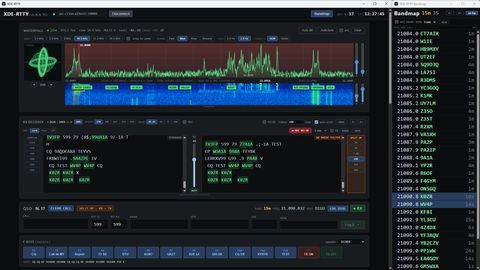
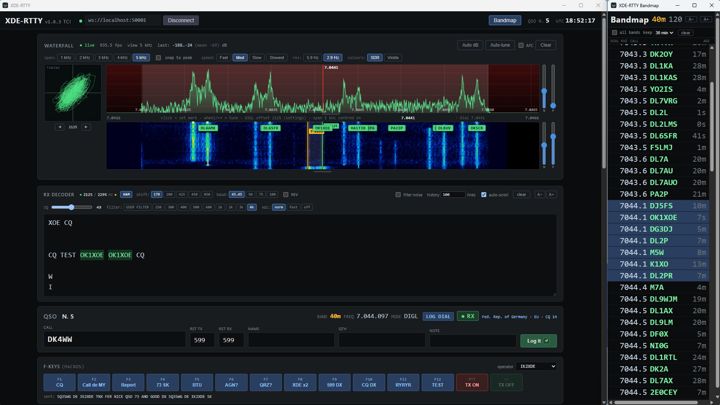
Designed for everyday RTTY traffic and DX, with the feel of the radio's own panorama.
Pensato per il traffico RTTY di tutti i giorni e per il DX, con l'aspetto del panorama della radio.
A second decoder, always on, for weak, fading and disturbed signals, side by side with the standard one: half the errors on real 40 m recordings. More →
Un secondo decoder sempre attivo per segnali deboli, in fading e disturbati, affiancato a quello standard: metà degli errori su registrazioni reali in 40 m. Dettagli →
NB (noise blanker) removes static crashes, electric-fence clicks and other short impulses; NOTCH finds and removes steady carriers near the signal (birdies, stations tuning up) by itself — RTTY tones are never touched. Both work in front of the decoders, on by default, one button each in the RX panel.
NB (noise blanker) elimina scariche, disturbi dei recinti elettrici e altri impulsi brevi; NOTCH trova ed elimina da solo le portanti fisse vicine al segnale (birdie, stazioni che si accordano) — i toni RTTY non vengono mai toccati. Lavorano davanti ai decoder, accesi di serie, un pulsante ciascuno nel pannello RX.
Go from XDE-RTTY to WSJT-X and back without touching ExpertSDR: offset only in DIGL, DIGU left at 0 for FT8/FT4, handled automatically in SPLIT UP. Settings →
Passa da XDE-RTTY a WSJT-X e viceversa senza toccare ExpertSDR: offset solo in DIGL, DIGU lasciato a 0 per FT8/FT4, gestito da solo in SPLIT UP. Impostazioni →
Transmit on the dial, listen up to 12.5 kHz above with every caller decoded, and move only the RX with one click. More →
Trasmetti sul dial, ascolti fino a 12,5 kHz sopra con ogni chiamante decodificato e sposti solo l'RX con un clic. Dettagli →
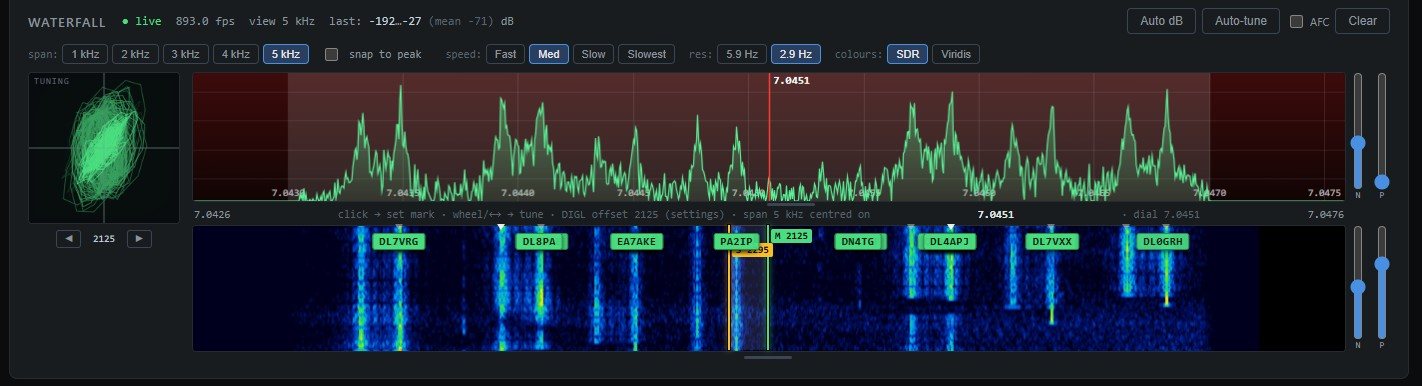
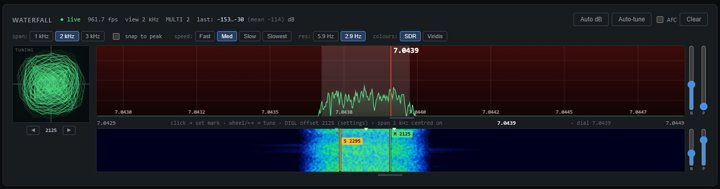
Centred on the dial (1–3 kHz) or opened above it in SPLIT UP (3.5–13 kHz), frequencies left to right like the radio, resolution down to 2.9 Hz, SDR colours, adjustable levels, movable divider and resizable panel.
Centrati sul dial (1–3 kHz) o aperti sopra in SPLIT UP (3,5–13 kHz), frequenze da sinistra a destra come sulla radio, risoluzione fino a 2,9 Hz, colori SDR, livelli regolabili, divisorio mobile e riquadro ridimensionabile.
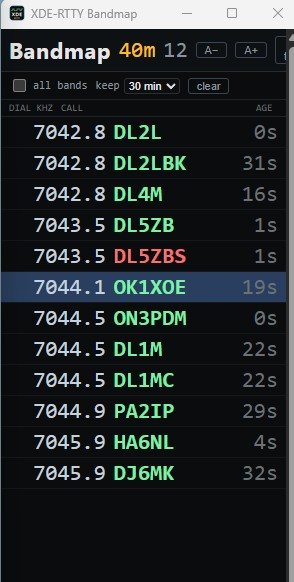
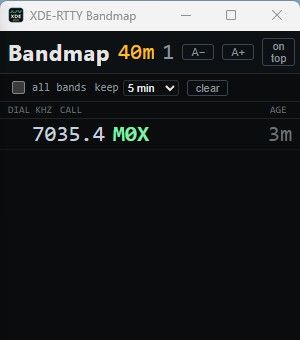
Callsigns copied anywhere in the passband (up to 12.5 kHz) appear on the waterfall and in a separate skimmer-style bandmap, worked stations in red. One click loads the call and tunes the radio.
I nominativi decodificati in tutta la banda passante (fino a 12,5 kHz) compaiono sul waterfall e in una bandmap separata, stile skimmer, con i già collegati in rosso. Un clic carica il nominativo e sintonizza la radio.
One click records 1–10 minutes of what you receive: RX audio (MP3), the text of both RX windows, an info file (frequency, mode, filter, tones, SQ…) and optionally the radio's I/Q. Sub-folders by date and band, destination of your choice. Ideal to compare filters, bands and decoders.
Un clic registra da 1 a 10 minuti di ricezione: audio RX (MP3), testo delle due finestre RX, un file info (frequenza, modo, filtro, toni, SQ…) e a scelta l'I/Q della radio. Sottocartelle per data e banda, destinazione a scelta. Ideale per confrontare filtri, bande e decoder.
At start-up XDE-RTTY checks this page for a new version: download and install with one click (size and SHA-256 checked), restart by itself, and the news open after the update. Can be turned off in Settings. On Linux it announces the new version and opens this page.
All'avvio XDE-RTTY controlla su questa pagina se c'è una nuova versione: scaricamento e installazione con un clic (dimensione e SHA-256 controllati), riavvio automatico e novità che si aprono dopo l'aggiornamento. Si può disattivare nelle impostazioni. Su Linux avvisa della nuova versione e apre questa pagina.
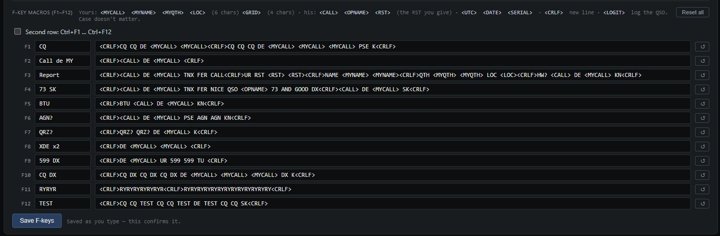
12 macros (plus Ctrl+F1…F12) with tokens like <CALL> and <LOGIT>; live keyboard sending by word, character or line.
12 macro (più Ctrl+F1…F12) con segnaposto come <CALL> e <LOGIT>; trasmissione dal vivo da tastiera per parola, carattere o riga.
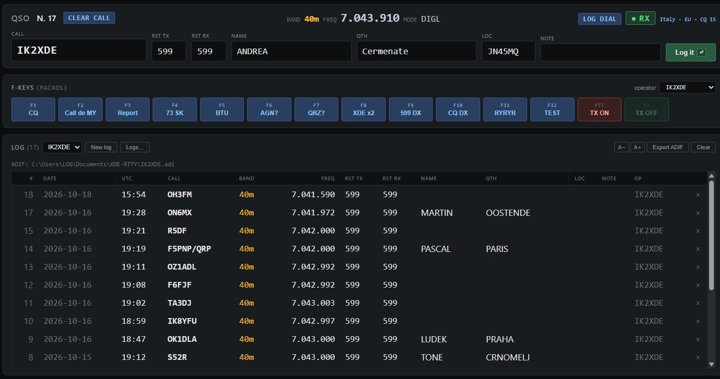
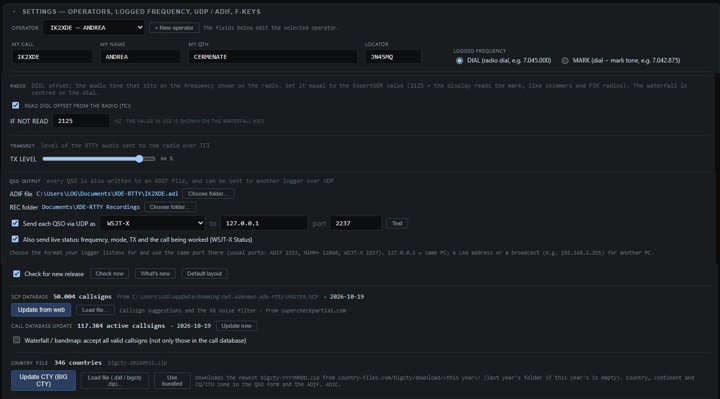
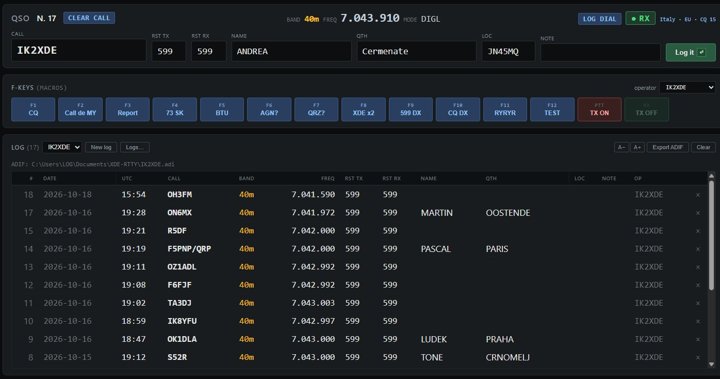
Multiple logs and operators, name/QTH/locator with one click from the RX window, worked-before flags, country lookup (BIG CTY), automatic ADIF file, ADIF import/export.
Più log e più operatori, nome/QTH/locator con un clic dalla finestra RX, segnalazione dei già collegati, paese (BIG CTY), file ADIF automatico, import/export ADIF.
Each QSO (with FREQ_RX in split) sent as ADIF, N1MM+ contactinfo or WSJT-X — with live status (frequency, mode and the call being worked).
Ogni QSO (con FREQ_RX in split) inviato come ADIF, N1MM+ contactinfo o WSJT-X — con lo stato in tempo reale (frequenza, modo e nominativo in lavorazione).
RX filters SIMPLEX 250–600 Hz centred on the station and SPLIT UP 3K–12.5K above the dial, AGC, automatic DIGL/DIGU (DIGU offset handled by itself), TX level and TX DELAY, DIAL/MARK logged frequency matching FSK and RBN spots.
Filtri RX SIMPLEX da 250 a 600 Hz centrati sulla stazione e SPLIT UP 3K–12.5K sopra il dial, AGC, DIGL/DIGU automatico (offset DIGU gestito da solo), livello TX e TX DELAY, frequenza a log DIAL/MARK allineata a FSK e spot RBN.
With SPLIT UP 3K – 12.5K (or a wide USER FILTER) XDE-RTTY decodes every RTTY station in the passband at the same time: a label on each signal and a live, skimmer-style bandmap. Bandmap colours: green = sure, light blue = uncertain (SCP suggestion), yellow = worked on another band, red = already in your log on that band.
Con SPLIT UP 3K – 12.5K (o un USER FILTER largo) XDE-RTTY decodifica contemporaneamente tutte le stazioni RTTY nella banda passante: un'etichetta su ogni segnale e una bandmap in tempo reale, stile skimmer. Colori della bandmap: verde = sicuro, azzurro = incerto (suggerito dall'SCP), giallo = collegato su un'altra banda, rosso = già nel log su quella banda.
Only complete callsigns reach the waterfall and the bandmap: calls in master.scp or in the call database (active callsigns, kept up to date automatically), or properly shaped calls copied several times. Truncated pieces on the same signal (DL7A, DL7AU of DL7AUO) are removed automatically. Uncertain calls (copied once, or copied several times but in neither database, or matching an SCP call but for one character) appear on the bandmap in light blue and turn green with the next sure copy; the waterfall shows sure calls only.
Sul waterfall e nella bandmap arrivano solo nominativi completi: quelli presenti nel master.scp o nel call database (nominativi attivi, aggiornato in automatico), oppure quelli con la struttura di un nominativo e decodificati più volte. I pezzi troncati sullo stesso segnale (DL7A, DL7AU di DL7AUO) vengono tolti automaticamente. I nominativi incerti (letti una volta, o letti più volte ma assenti da entrambi i database, o uguali a un nominativo SCP a meno di un carattere) compaiono nella bandmap in azzurro e diventano verdi alla successiva decodifica sicura; il waterfall mostra solo quelli sicuri.
Click an image to enlarge it.Fai clic su un'immagine per ingrandirla.

Version 2.1.0 · free of charge for radio amateurs · total downloads: 327
Versione 2.1.0 · gratuita per i radioamatori · download totali: 327
.deb: double-click or sudo apt install ./XDE-RTTY_2.1.0_amd64.deb. .AppImage: chmod +x the file and run it. Details in the manual..deb: doppio clic o sudo apt install ./XDE-RTTY_2.1.0_amd64.deb. .AppImage: chmod +x sul file e avvialo. Dettagli nel manuale.| OS | Windows 10 / 11 (64 / 32 bit) · Linux 64 bit BETA | |
| Radio | SunSDR with ExpertSDR3 v1.3.2 or later · latest TCI 2.1 protocol | SunSDR con ExpertSDR3 v1.3.2 o successivi · ultimo protocollo TCI 2.1 |
| Runtime | Windows: Microsoft WebView2 (included in Windows 10/11) · Linux: WebKitGTK (installed with the .deb) | Windows: Microsoft WebView2 (incluso in Windows 10/11) · Linux: WebKitGTK (installato con il .deb) |
| Internet | Optional: country file, SCP and call database updates | Facoltativo: aggiornamento file paesi, SCP e call database |
Full details in the user manual.
Tutti i dettagli nel manuale d'uso.
In ExpertSDR3 (v1.3.2 or later) enable the TCI 2.1 server (default port 50001).
In ExpertSDR3 (v1.3.2 o successivi) attiva il server TCI 2.1 (porta di serie 50001).
TX → DIGL Modulator → Offset 2125 in ExpertSDR (DIGU stays at 0 for FT8/FT4). See the required settings.
TX → DIGL Modulator → Offset 2125 in ExpertSDR (il DIGU resta a 0 per FT8/FT4). Vedi le impostazioni obbligatorie.
The address ws://127.0.0.1:50001 is already filled in (change it if needed): press Connect. Fill in your call, name, QTH and locator in Settings.
L'indirizzo ws://127.0.0.1:50001 è già impostato (cambialo se serve): premi Connect. In Settings inserisci nominativo, nome, QTH e locatore.
Press HAM, click a station on the waterfall, use F1–F12, log with Enter. Esc stops any transmission.
Premi HAM, fai clic su una stazione nel waterfall, usa F1–F12, registra con Invio. Esc ferma qualsiasi trasmissione.
Main changes only.Solo le modifiche principali.
| 2.1.0 | New TX DELAY: a short silence after PTT before any RF, so the radio and the amplifier are already in TX. Updated to the TCI 2.1 protocol: a clear message if the radio does not allow transmitting on a band. REC: RX audio as MP3, I/Q stays WAV. | Nuovo TX DELAY: breve silenzio dopo il PTT prima della RF, così radio e amplificatore sono già in TX. Aggiornato al protocollo TCI 2.1: messaggio chiaro se la radio non consente di trasmettere su una banda. REC: audio RX in MP3, l'I/Q resta in WAV. |
| 2.0.9 | SPLIT UP: the radio's DIGU offset is set by itself and restored — one ExpertSDR setup for RTTY and FT8/FT4. TCI address preset. Also for Linux (beta). | SPLIT UP: l'offset DIGU della radio viene regolato da solo e rimesso com'era — una sola configurazione di ExpertSDR per RTTY e FT8/FT4. Indirizzo TCI già impostato. Anche per Linux (beta). |
| 2.0.8 | New CALL DATABASE UPDATE: more stations recognised on the waterfall and the bandmap, fewer false calls; kept up to date automatically. | Nuovo CALL DATABASE UPDATE: più stazioni riconosciute su waterfall e bandmap, meno nominativi falsi; aggiornato in automatico. |
| 2.0.7 | New noise blanker (NB) and automatic notch (NOTCH): better copy with static crashes and with carriers near the signal. | Nuovi noise blanker (NB) e notch automatico (NOTCH): ricezione migliore con scariche e con portanti vicine al segnale. |
| 2.0.6 | Improved STANDARD decoder in noise and fading; faster AFC; reports and numbers copied correctly more often; larger frequency display. | Migliorato il decoder STANDARD con rumore e fading; AFC più veloce; rapporti e numeri letti correttamente più spesso; frequenza più grande. |
| 2.0.5 | Bandmap and waterfall: improved choice of the stations shown. | Bandmap e waterfall: migliorata la scelta delle stazioni mostrate. |
| 2.0.3 | Improved recognition of the stations on bandmap and waterfall; SPLIT UP 12.5K with full waterfall and spectrum. | Migliorato il riconoscimento delle stazioni su bandmap e waterfall; SPLIT UP 12.5K con waterfall e spettro completi. |
| 2.0.2 | Improved QSO sending over UDP in WSJT-X format. | Migliorato l'invio dei QSO via UDP in formato WSJT-X. |
| 2.0.1 | More stations on the waterfall and bandmap (improved multi-decoder); SPLIT UP 12.5K instead of 15K/20K, which the radio does not allow; SCP file date in Settings. | Più stazioni su waterfall e bandmap (multi-decoder migliorato); SPLIT UP 12.5K al posto di 15K/20K, che la radio non consente; data del file SCP nelle impostazioni. |
| 2.0.0 | New RX decoder layout: both decoders always open side by side, SIMPLEX filters left, SPLIT UP right, vertical squelch in the middle; default layout for 1920×1080 with the bandmap at the right; Telegram channel. | Nuova disposizione del decoder RX: i due decoder sempre aperti e affiancati, filtri SIMPLEX a sinistra, SPLIT UP a destra, squelch verticale in mezzo; disposizione iniziale per 1920×1080 con la bandmap a destra; canale Telegram. |
| 1.9.9 | SPLIT UP: new 15K and 20K windows; filter and span back to default after a band change; updates install without a console window. | SPLIT UP: nuove finestre 15K e 20K; filtro e span tornano al default dopo un cambio banda; aggiornamenti senza finestra di console. |
| 1.9.8 | General code optimisation; manuals updated. | Ottimizzazione generale del codice; manuali aggiornati. |
| 1.9.7 | Bandmap: more stations shown, calls not yet in the SCP in light blue. Loc (WW locator) field in the QSO form and the log. REC shows "SAVED". | Bandmap: più stazioni visualizzate, nominativi non ancora nell'SCP in azzurro. Campo Loc (WW locator) nel modulo QSO e nel log. Il REC mostra "SAVED". |
| 1.9.6 | Improved receiver and squelch; AUTO squelch button. | Migliorati il ricevitore e la gestione dello squelch; pulsante AUTO per lo squelch. |
| 1.9.5 | REC: receive-only recordings of 1–10 minutes (RX audio WAV, text of both RX windows, info file, optional I/Q), sub-folders by date and band, destination selectable. Bandmap: uncertain calls (SCP suggestion) in light blue. | REC: registrazioni in sola ricezione da 1 a 10 minuti (audio RX WAV, testo delle due finestre RX, file info, I/Q a scelta), sottocartelle per data e banda, destinazione a scelta. Bandmap: nominativi incerti (suggeriti dall'SCP) in azzurro. |
| 1.9.4 | Automatic update: the program checks this page for new releases, downloads and installs them; what's new opens by itself after the update. Option "Check for new release" in Settings. | Aggiornamento automatico: il programma controlla questa pagina, scarica e installa le nuove versioni; le novità si aprono da sole dopo l'aggiornamento. Opzione "Check for new release" nelle impostazioni. |
| 1.9.0 – 1.9.3 | DX NOISE FILTER: second decoder for weak and fading signals, STANDARD DECODER / DX NOISE FILTER buttons; improved standard decoder; apostrophe (US layout); own call never spotted. | DX NOISE FILTER: secondo decoder per segnali deboli e in fading, pulsanti STANDARD DECODER / DX NOISE FILTER; decoder standard migliorato; apostrofo (layout USA); il proprio nominativo non viene mai spottato. |
| 1.8.9 | No more truncated callsigns on the bandmap and the waterfall: calls taken only when complete, the full call replaces its pieces on the same signal. TCI 2.0, ExpertSDR3 v1.3.2 or later. | Niente più nominativi troncati in bandmap e sul waterfall: nominativi presi solo se completi, quello completo sostituisce i pezzi sullo stesso segnale. TCI 2.0, ExpertSDR3 v1.3.2 o successivi. |
| 1.8.6 – 1.8.8 | Automatic SPLIT UP MODE for DX EXPEDITION with Multi Decoder: SIMPLEX (250–600 Hz) and SPLIT UP (3K–10K) filters, click a caller to move only the RX, FREQ + FREQ_RX logged and sent via UDP, more reliable multi-decoder on wide windows. | SPLIT UP MODE automatico per DX EXPEDITION con Multi Decoder: filtri SIMPLEX (250–600 Hz) e SPLIT UP (3K–10K), clic su un chiamante per spostare solo l'RX, FREQ + FREQ_RX a log e via UDP, multidecoder più affidabile sulle finestre larghe. |
| 1.8.4 | CLEAR CALL button; worked stations in red in the bandmap; QSY from bandmap/spots keeps the VFO centred on the radio panorama. | Pulsante CLEAR CALL; stazioni già collegate in rosso nella bandmap; il QSY da bandmap/spot mantiene il VFO al centro del panorama della radio. |
| 1.8.3 | Side level controls (N/P) for spectrum and waterfall; resizable spectrum + waterfall panel. | Regolatori laterali (N/P) per spettro e cascata; riquadro spettro + cascata ridimensionabile. |
| 1.8 | Spectrum above the waterfall, SDR colours, resolution up to 2.9 Hz, movable divider; TX ON opens the KEY window; UDP live status (WSJT-X / N1MM+). | Spettro sopra la cascata, colori SDR, risoluzione fino a 2,9 Hz, divisorio mobile; TX ON apre la finestra KEY; stato UDP in tempo reale (WSJT-X / N1MM+). |
| 1.7 | DIGL offset support; waterfall centred on the dial, frequencies increasing left to right. | Gestione dell'offset DIGL; waterfall centrato sul dial, frequenze crescenti da sinistra a destra. |
| 1.6 | New layout and colours; tuning scope beside the waterfall; RX filters 250 Hz – 4 kHz. | Nuova grafica e colori; scope di sintonia accanto al waterfall; filtri RX da 250 Hz a 4 kHz. |
| 1.4 | RX filter and AGC from the program; adjustable TX level; second F-key row; font size buttons. | Filtro RX e AGC dal programma; livello TX regolabile; seconda fila di F-key; dimensione del testo. |
| 1.3 | Separate bandmap (skimmer) window; accept all valid callsigns. | Finestra bandmap (skimmer) separata; accettazione di tutti i nominativi validi. |
| 1.1 – 1.2 | Multiple operators; BIG CTY download; automatic ADIF file; UDP output (ADIF, N1MM+, WSJT-X). | Più operatori; scaricamento BIG CTY; file ADIF automatico; invio UDP (ADIF, N1MM+, WSJT-X). |
| 1.0 | First release: RTTY terminal for TCI radios with general QSO log. | Prima versione: terminale RTTY per radio TCI con log QSO generale. |
XDE-RTTY is freeware for ham radio use: free of charge for radio amateurs, and you are welcome to share it. It is provided "as is", without warranty. XDE-RTTY includes open-source code released under the MIT licence; the licence notice is installed with the program and printed in the manual.
XDE-RTTY è freeware for ham radio use: gratuito per i radioamatori, che possono condividerlo liberamente. È fornito "così com'è", senza garanzie. XDE-RTTY include codice open source rilasciato con licenza MIT; il testo della licenza è installato con il programma e riportato nel manuale.
 XDE-RTTY